


Moras
4.446.00 Reviews
App Specs
- Version
- 1.1.15
- Updated On
- License
- Free
- Downloads
- 10,000+
- Developer
- k2lab
- Categories
- Business
- Platform
- Android
Screenshots


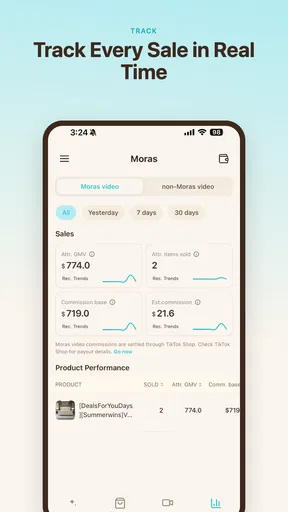
 Analysis by AppCompare
I approached Moras as a practical question rather than a novelty: can a small business turn an existing product into a TikTok-ready video without spending an afternoon learning an editor? That is the useful promise behind this free business app from k2lab. Its focus is narrow, which is a good thing when you need short promotional content rather than a full video-production workspace.
My overall impression is that Moras makes the most sense for sellers, independent creators, and small teams that already know what they want to promote but struggle to package it in a format suited to TikTok. It is not a replacement for every social video tool. Instead, it sits between a product catalog and a finished vertical clip, aiming to reduce the creative distance between the two.
The app is available to an Everyone audience and runs on Android 7.0 or later. It is free to use, and its current version is 1.1.14. Those details make it approachable for testing, especially if you want to try a product-focused workflow before committing to a more involved editing platform.
What I would check before choosing a product-video app
When I decide whether an app belongs in a small business workflow, I look at four things first: how quickly I can start, how much creative control I retain, whether the result feels native to the target platform, and how much repeated work is involved. A tool can produce an attractive first clip and still be frustrating if every new product requires the same tedious setup.
Moras is aimed at the moment when the raw material already exists. You have a product, perhaps a few images or a product presentation, and you want to turn that material into a short social video. That is different from opening a blank editor and asking what to film, how to arrange the shots, and which text to add. The app’s value is therefore tied to preparation: the clearer your product information and visual assets are, the more useful the resulting workflow is likely to be.
I would also judge the app by the type of content you publish. A product video has a different job from a personal vlog, a tutorial, or a cinematic brand film. It needs to show what is being sold quickly, make the item understandable on a phone screen, and give the viewer a reason to keep watching. Moras is most relevant when that direct commercial purpose is central.
There is a practical distinction between making a video and making a video that can be repeated. If I need one launch clip for a single item, almost any competent editor may be enough. If I need to prepare several product posts over a week, the important question becomes whether the app helps me maintain a consistent rhythm without turning every post into a separate design project.
Worth Reading Before You Choose

Flipboard Shows What News Apps Must Do Beyond the Feed

Switching to Android Auto Means Rethinking Your Driving Routine

Google Calendar Makes a Crowded Week Easier to Manage

Ludo King Makes the Most of the Minutes Between Plans

Baby Panda World Brings Quick Play to Modern Phones, but Its Game Library Feels Busy

ESPN’s Live Game View Makes Following Close Games Easier
A focused starting point for sellers
The strongest idea here is the product-first approach. Instead of treating the product as one element inside a general timeline, Moras is built around the product as the reason the video exists. That focus can help users who are comfortable selling but not comfortable with editing terminology, layers, transitions, and audio timelines.
In my experience, a narrow app can feel faster because it removes decisions that are useful in professional software but unnecessary for a simple sales post. A general editor may offer more options, yet those options can slow down someone who only wants to transform product material into a concise TikTok video. Moras appears designed for that more direct decision.
That does not mean the app can solve weak source material. If the product image is poorly lit, the description is vague, or the main benefit is difficult to explain, no automated or focused workflow can completely repair the message. I would prepare the product information first, choosing one clear selling point rather than trying to include every detail in a single short clip.
How I would use it in an everyday business routine
Imagine I run a small online shop selling handmade desk accessories. A new organizer arrives, and I have a clean product photo, a short description, and one useful detail: it keeps frequently used items within reach without taking much space. I would begin with that single benefit rather than writing a long catalog paragraph. The goal would be to give the video a clear center.
From there, I would treat the app as a conversion step. I would bring in the product material, check whether the visual emphasis is immediately understandable, and review the finished result as if I were seeing it while scrolling quickly. If the product name dominates while the benefit is buried, I would revise the source wording before blaming the video format.
A useful habit is to create variations based on different customer questions. One version might focus on appearance, another on the everyday problem the item solves, and a third on how it fits into a workspace. This is more informative than making three nearly identical clips with different colors. Moras is particularly useful when it helps me turn one product into several distinct communication angles.
I would also keep the first few seconds in mind. A viewer should understand what is being shown without waiting for a long introduction. Product content benefits from immediate clarity: the item, its purpose, and the reason it deserves attention should arrive in a compact sequence. Even if the app simplifies production, the editorial decision remains mine.
Where the app is likely to save time
Moras can be valuable for people who do not have a dedicated content team. A shop owner may know the inventory better than anyone but have limited time for social media. A freelancer may need to produce promotional material for several clients without opening a complex editor for every item. A small brand may want a repeatable way to turn catalog material into social content while keeping its attention on orders and customers.
The time saving is not only the number of taps. It also comes from reducing the mental load of starting. A blank canvas asks me to make many creative decisions at once. A product-centered workflow gives me a more concrete task: take this item and shape it for a short video. That is a meaningful advantage for users who postpone content because the process feels too open-ended.
Another non-obvious benefit is consistency. If the app encourages me to work from product information in a similar way each time, I can build a recognizable publishing routine. Consistency does not mean every post should look identical, but it does mean I spend less energy reinventing the basic structure of each product presentation.
What I would inspect before publishing
I would not publish the first generated result automatically. I would check whether the product remains the visual priority, whether text is easy to read on a small screen, and whether the wording sounds like a real recommendation rather than a copied catalog entry. A technically complete video can still feel lifeless if it says nothing specific about why the product matters.
I would pay special attention to claims. If the source material includes a feature, I would make sure the wording does not accidentally turn it into an exaggerated promise. Short-form video encourages compression, but compression should remove clutter, not accuracy. For a business account, a clear and modest claim is safer and usually more credible than a dramatic one.
I would also watch for repetition when preparing several items. If every clip uses the same sentence pattern, viewers may recognize the formula too quickly. The practical solution is to vary the angle: show a use case for one product, a design detail for another, and a common customer problem for a third. The app can help with production, but the variety has to come from the information I choose to emphasize.
Where Moras wins, and where another category may fit better
I find the choice comes down to what is slowing your product content down: shaping existing product material into a short post, or controlling every moment of a broader video. I would start with the former if catalog items are piling up, then judge the workflow by how much useful editing remains. That distinction points to the situations where another category may serve you better.
Its advantage over a general video editor
The clearest advantage is focus. A general mobile editor is usually better when I want to control a complete production from beginning to end. It may suit footage recorded manually, a talking-head explanation, a tutorial, or a video with a carefully timed narrative. But that flexibility can be excessive for someone starting with product material and wanting a promotional result quickly.
Moras is easier to justify when the user’s main problem is not advanced editing but conversion. The product already exists; the challenge is presenting it in a social format. A focused tool can make that path less intimidating, particularly for a first-time seller who does not want to learn a full editing vocabulary before publishing a simple clip.
The trade-off is control. If I need precise timing, detailed sound design, complex compositing, or a carefully staged sequence of filmed shots, I would choose a conventional editor instead. Moras should be viewed as a specialized route to product content, not as a universal replacement for creative software.
Its advantage over static product posts
A static image can be efficient, especially when the product is visually self-explanatory. However, a short video gives me more room to establish context. I can move from the item itself to the problem it addresses, or from a general view to a detail that matters. For products that benefit from sequence and explanation, turning catalog material into motion can make the presentation feel more active.
There is also a workflow advantage in thinking beyond a single image. A static post often ends with the viewer deciding what the item is. A product video can guide the viewer through a small argument: here is the item, here is what it does, and here is why it might belong in your routine. Moras is most compelling when that progression can be built from the material I already have.
Still, video is not automatically better. If the product has one simple visual message and the video adds no useful information, a well-composed image may communicate faster. I would use Moras when movement, sequence, or explanation improves understanding, not merely because video is fashionable.
When social-native creation may be preferable
Some businesses rely on spontaneous, personality-led content. A founder speaking directly to the camera, a live demonstration, or a behind-the-scenes clip may perform better for that audience than a product-focused presentation. In those cases, the human voice and real setting are part of the value, and a specialized product workflow may feel too formal or indirect.
I would also consider another approach when the brand has strict visual rules. If every frame must match a carefully controlled identity system, a broader design or editing environment may offer more dependable control. Moras is better suited to speed and accessibility than to a production pipeline where every detail is approved by a creative department.
The right choice depends on the bottleneck. If I lack ideas, I need a content strategy. If I lack footage, I need a way to record better material. If I have product assets but cannot turn them into social posts efficiently, Moras addresses the more specific problem.
Who should probably skip it
I would skip Moras if my main work is long-form video, gaming clips, travel edits, interviews, or personal storytelling. Those formats depend on narrative control beyond the product-centered use case. I would also look elsewhere if I need a highly customized timeline or if my business already has a reliable editor and established templates.
It may not be the best fit for someone who expects the app to create a complete marketing strategy. A video can present an item, but it cannot decide which audience matters, what objection needs answering, or whether the offer is genuinely attractive. Those are business decisions, and I would make them before opening the app.
The real cost of switching to a new workflow
Because Moras is free, the main cost is not a subscription decision. It is the time spent changing habits. I would need to organize product images, clarify descriptions, decide which benefits deserve separate videos, and establish a review step before posting. That preparation is worthwhile only if I plan to publish product content repeatedly.
There is also a learning curve, even for a focused app. I would test one product first rather than moving an entire catalog immediately. That trial would answer practical questions: how much editing remains after the initial setup, whether the visual result matches my brand, and whether the workflow is faster than the alternative I already use.
A good switching method is to compare like with like. I would choose one product, prepare one video in Moras, and create a second version using my usual editor. Then I would compare the time required, the clarity of the message, and how much correction each version needs. The better tool is not necessarily the one with more features; it is the one that produces an acceptable result with less friction for my actual routine.
I would keep the original product assets separate from the app workflow. That way, changing tools later does not mean rebuilding the product information from memory. It also makes it easier to reuse the same material in a product page, an image post, or another social format.
Another useful trade-off is speed versus distinctiveness. A focused workflow may help me publish more consistently, but a recognizable brand still needs variation in wording, examples, and visual emphasis. I would use the app to simplify production while reserving my own attention for the parts viewers can feel: the choice of benefit, the order of information, and the honesty of the presentation.
What the current adoption suggests for a cautious tester
Moras has an average rating of 4.4 from around eighty ratings, with over forty written reviews and more than ten thousand installs. That gives me enough public usage to take the app seriously, while still making me treat it as a focused tool to test against my own workflow rather than an automatic fit for every business.
Its release date is May 6, 2026, so I would approach it as a relatively new option and pay attention to how comfortably it fits my needs over several projects. The developer is k2lab, and the current version is 1.1.14. For me, the practical response to a newer app is simple: start small, keep copies of important assets, and judge the workflow by repeated use rather than by one attractive first result.
My recommendation for different types of users
I recommend trying Moras if you sell physical products, already have basic product material, and want a simpler path to TikTok-oriented promotional videos. It is especially appealing when the alternative is not publishing at all because a full editor feels too complicated. The free price removes much of the risk of a small experiment, and the Everyone rating makes it broadly approachable.
I would recommend a cautious trial for agencies and freelancers. It may be useful for quick first drafts, recurring catalog work, or clients who need a practical volume of product clips. I would not assume it can replace a more controlled production system until I have tested consistency across several products and reviewed the results carefully.
I would not recommend choosing it solely because you want viral results. The app can help package product information for TikTok, but attention still depends on the product, the opening idea, the audience, and the quality of the message. A polished format cannot compensate for an unclear offer or an uninteresting angle.
My final view is positive but specific: Moras is worth trying when your problem is turning products into short social content, not when your problem is video editing in general. I like the decision it makes on the user’s behalf by keeping the product at the center. If I were running a small shop, I would test it with one item, create several genuinely different angles, inspect every claim and text element, and compare the time against my usual editor. If that test produced usable videos without slowing down the rest of the business, I would keep it as a repeatable part of my catalog workflow.
Pros
- Simple interface makes daily use quick and easy
- Helpful reminders support consistent tracking habits
- Lightweight app uses little storage and battery
- Clear progress views make improvements easy to follow
- Useful for beginners who want a straightforward experience
Cons
- Some features may require a premium subscription
- Limited customization can feel restrictive for advanced users
- Reminder options may not be detailed enough for everyone
- Progress insights could be more comprehensive
- Requires regular manual input to keep information accurate
FAQs for Moras
What is Moras, and what can I use it for?
Moras is a mobile application designed to help users manage and organize their daily activities, depending on the features available in the specific version you download. Before installing it, check the official store description and screenshots to confirm whether it matches your needs. The app’s usefulness will largely depend on its interface, supported tools, and how consistently you plan to use it.
Is Moras free to download and use?
Moras may be available as a free download, but some functions could require in-app purchases, a subscription, or additional paid content. Pricing and available features can vary between Android and iOS, as well as by region. We recommend reviewing the app-store listing carefully before downloading, especially the subscription terms, trial period, renewal policy, and whether essential features are restricted behind a payment.
Does Moras require an internet connection?
The connection requirements depend on which Moras features you use. Basic sections may work offline, while account synchronization, cloud backups, online content, updates, or other connected services may require Wi-Fi or mobile data. If offline access is important to you, check the official description and test the app after installation so you know which functions remain available without an active internet connection.
Is Moras safe and suitable for my device?
Moras should be downloaded only from the official Google Play Store or Apple App Store to reduce the risk of modified or unsafe versions. Before installing, verify the developer name, recent update history, ratings, required permissions, and privacy information. Also check the minimum Android or iOS version, because older devices may experience compatibility issues, slower performance, or limited access to newer features.
What permissions and personal information does Moras request?
The permissions requested by Moras can vary according to its tools and your device. Some permissions may be necessary for notifications, storage, camera access, location, contacts, or account functionality, while others may not be essential. Review the privacy label or data-safety section in the relevant app store before installation, and deny permissions that do not appear necessary for the features you intend to use.


